Is your business website struggling to appear on Google? Whether you run a salon, coaching centre, restaurant, consultancy, retail shop, or service-based business in Patna, an SEO audit can help you identify issues that may be affecting your website's search visibility.
An SEO audit is a systematic review of your website's technical health, content, keywords, page structure, user experience, and internal links. It helps you understand what is working, what needs improvement, and which SEO tasks should be prioritized.
In this guide, we will cover a practical SEO audit checklist for small businesses in Patna, Bihar, that you can use to improve your website and build a stronger online presence.
What Is an SEO Audit?
An SEO audit examines the factors that influence how search engines discover, understand, and index your website. It also checks whether your pages provide useful information and a good experience for visitors.
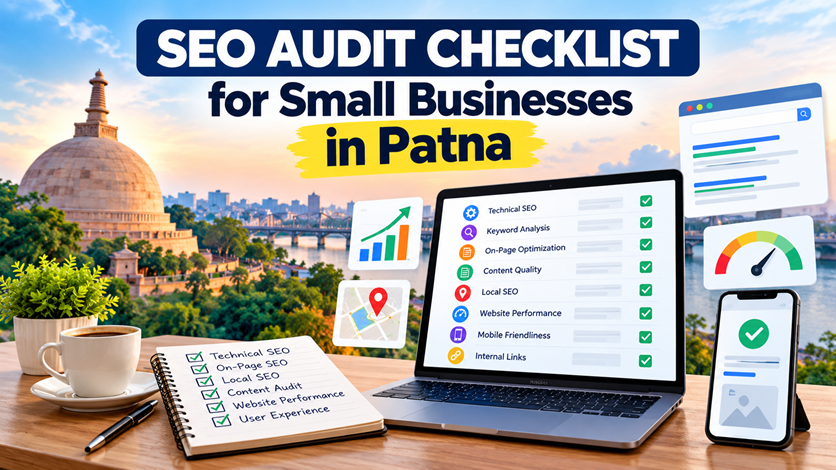
A typical SEO audit covers technical SEO, keyword research, on-page optimization, content quality, internal linking, mobile usability, website performance, and local search visibility.
If you need professional assistance, explore our SEO Services in Patna to understand how website optimization can support your business goals.
Why Do Small Businesses in Patna Need an SEO Audit?
Customers increasingly use search engines to discover local businesses, compare services, read reviews, and find contact information. A website that is difficult to access, poorly structured, or irrelevant to customer searches may miss valuable opportunities.
An SEO audit can help your business:
- Identify technical issues that affect crawling and indexing.
- Find relevant keywords for your products and services.
- Improve page titles, headings, and meta descriptions.
- Make important service pages easier to discover.
- Improve mobile usability and website performance.
- Strengthen local search visibility in Patna.
- Identify outdated content and broken links.
- Make it easier for potential customers to contact your business.
SEO Audit Checklist for Small Businesses
1. Check Whether Your Website Is Indexed on Google
Start by checking whether Google has indexed your important website pages. Indexed pages may be eligible to appear in search results, although indexing does not guarantee rankings.
Search Google using the query site:yourdomain.com, replacing the example with your actual domain. This can provide a rough indication of indexed pages, but it is not a complete or definitive indexing report.
For more reliable information, open Google Search Console and review the Page Indexing report and URL Inspection tool.
- Check whether your homepage is indexed.
- Inspect important service pages and published blogs.
- Look for accidental noindex directives.
- Review pages excluded because of redirects or canonical settings.
- Investigate important URLs that Google has not indexed.
Official resource: Google Search Console URL Inspection Tool.
2. Review Your XML Sitemap
An XML sitemap helps search engines discover important URLs on your website. It is particularly useful for communicating which pages you consider important for crawling and indexing.
Check your sitemap to confirm that it:
- Loads correctly and returns valid XML.
- Includes the preferred, canonical URLs of important pages.
- Does not contain URLs that redirect or return errors.
- Does not include pages you intentionally want to exclude from search.
- Is submitted in Google Search Console.
Official resource: Google's XML Sitemap Guidelines.
3. Check Your Page Titles and Meta Descriptions
Every important page should have a unique, descriptive title that reflects its main topic. Meta descriptions should accurately summarize the page and give searchers a reason to visit.
For a local business, a relevant title might be:
SEO Services in Patna for Small Businesses | Brand Name
A suitable meta description could explain the services offered, the intended audience, and the value the business provides.
- Write a unique title for each important page.
- Describe the page accurately.
- Use your target keyword naturally.
- Avoid repetitive keyword stuffing.
- Make sure titles and descriptions match the actual page content.
4. Review Your Heading Structure
Headings help readers understand the organization of your content. They also provide search engines with useful context about a page.
- Use one clear primary H1 heading for the main topic.
- Use H2 headings for major sections.
- Use H3 headings for relevant subsections.
- Keep headings descriptive and natural.
- Avoid adding location keywords to every heading unnecessarily.
For example, an article about SEO audits can use headings such as "Technical SEO Checklist," "Local SEO Checklist," and "How to Measure SEO Performance."
5. Check Keyword Targeting and Search Intent
Keyword research helps you understand how potential customers search for your products and services. The goal is not to insert as many keywords as possible, but to create useful pages that match the intent behind relevant searches.
Depending on your services, potential keyword themes may include:
- SEO services in Patna
- Local SEO services in Patna
- On-page SEO services in Patna
- Website development in Patna
- Social media marketing in Patna
Assign a clear primary topic to each important page. Avoid creating multiple pages that target the same intent without a meaningful difference in content or purpose.
Review your actual search queries in Google Search Console to discover which keywords are already generating impressions and where content improvements may help.
6. Optimize Your Service Pages
Your service pages should explain what you offer, who the service is for, how the process works, and how customers can contact you. A page with only a few generic paragraphs may not answer enough questions to help visitors make a decision.
For each service page, check that it includes:
- A clear service description and relevant heading.
- Specific benefits and deliverables.
- Useful information about your process.
- Answers to common customer questions.
- Relevant examples or genuine case studies, where available.
- Internal links to related services and helpful articles.
- A clear contact or enquiry option.
Small businesses can review these relevant service pages from Owntus Media:
- SEO Services in Patna
- Local SEO Services in Patna
- On-Page SEO Services in Patna
- Website Development in Patna
- Social Media Marketing in Patna
7. Audit Your Local SEO
Local SEO can help businesses improve their online presence for relevant searches connected with a geographic area. It is especially important for businesses that serve customers in Patna or nearby locations.
Review the following local SEO elements:
- Keep your business name, address, and phone number accurate wherever they are published.
- Maintain an eligible and accurate Google Business Profile.
- Select relevant business categories.
- Add accurate service descriptions, business hours, and photos where appropriate.
- Encourage genuine customer reviews without offering prohibited incentives.
- Respond to customer reviews professionally.
- Build relevant local references and business listings.
- Create location pages only when they provide genuine, useful information for those areas.
Learn more about Local SEO Services in Patna and how local search optimization may support your business.
Official resource: Google's guidance on improving local ranking.
8. Check Website Speed and Mobile Usability
Many customers visit business websites from smartphones. Your website should be easy to navigate, readable on smaller screens, and responsive to different device sizes.
Audit these elements:
- Check whether text is readable without zooming.
- Make sure navigation menus work on mobile devices.
- Ensure buttons and links are easy to tap.
- Compress large images and use suitable image dimensions.
- Reduce unnecessary scripts and heavy page elements.
- Check for layout shifts and slow-loading content.
- Test important pages using Google PageSpeed Insights.
Use Google PageSpeed Insights to assess performance and review available Core Web Vitals data. Prioritize improvements based on real measurements rather than assuming that every website has the same problems.
If your website needs structural or usability improvements, explore Website Development in Patna.
9. Review Internal Links and Broken Links
Internal links connect related pages on your website. They help visitors discover useful information and give search engines additional context about how your pages relate to one another.
During your audit:
- Link relevant blog articles to their corresponding service pages.
- Use descriptive anchor text that explains the destination.
- Check for broken internal links.
- Make important pages accessible through logical navigation.
- Review pages that receive no useful internal links.
- Avoid adding unrelated links simply to increase link counts.
For example, an article about local search optimization can link to your Local SEO service page. A guide to improving service pages can link to your On-Page SEO service page.
Read our related article, SEO Services in Patna: What Does an SEO Agency Actually Do?, for more information about different areas of SEO.
10. Check Content Quality and Relevance
Useful website content should answer the questions your audience actually has. Content that repeats the same keywords without providing additional value may not satisfy visitors.
Review each important page and ask:
- Does the content answer the main question clearly?
- Is the information accurate and current?
- Does it explain the subject in enough useful detail?
- Does it offer original examples, experience, or insights where possible?
- Does it contain unnecessary repetition?
- Does it link to relevant services and supporting resources?
- Does it help visitors decide what to do next?
Update outdated content when needed. If two articles serve almost the same search intent, evaluate whether they should be differentiated, improved, redirected, or consolidated. Make these decisions after reviewing the pages and their search performance.
11. Review Images and Image SEO
Images can support user understanding, but poorly optimized images may slow down a website or create accessibility problems.
- Use descriptive file names where practical.
- Write meaningful alt text for informative images.
- Use empty alt text for purely decorative images when appropriate.
- Compress images and choose suitable formats.
- Use responsive image sizes.
- Avoid adding keywords unnaturally to every alt attribute.
For example, an image showing a website analytics dashboard could use alt text such as "Website analytics dashboard displaying organic search performance" if that accurately describes the image.
12. Check Canonical URLs, Redirects, and HTTPS
Technical configuration can affect how search engines interpret different versions of your URLs. An audit should confirm that important pages use the intended canonical URL and that redirects work as expected.
- Confirm that important pages load securely over HTTPS.
- Check for redirect chains and redirect loops.
- Review canonical tags on important pages.
- Look for multiple URL versions serving substantially similar content.
- Ensure internal links point to the preferred URLs.
- Investigate unexpected 404 errors on important pages.
Do not redirect or remove a URL solely because its path looks similar to another. First compare the content, purpose, canonical settings, backlinks, traffic, and existing redirects.
13. Measure SEO Performance in Google Search Console
Google Search Console provides useful information about how your website performs in Google Search. It helps you understand which queries generate impressions and clicks and which pages appear in search results.
Review these metrics regularly:
- Clicks: How often users clicked your search result.
- Impressions: How often your result appeared in search results.
- Click-through rate: The proportion of impressions that resulted in clicks.
- Average position: The average position of your result for the selected reporting data.
- Indexing: Whether important pages are eligible to appear in search.
Compare results over consistent date ranges. A page with impressions but few clicks may need a more relevant title or description, while a page with very low visibility may need improvements to its content, relevance, technical accessibility, or internal linking.
Use Google Search Console to review your site's search performance.
How Often Should You Conduct an SEO Audit?
Small businesses can perform a basic SEO review every month and a more comprehensive audit periodically. The ideal frequency depends on how often the website changes and whether it has experienced technical issues or significant changes in search performance.
Consider a fresh audit when:
- You launch a new website or redesign an existing one.
- You add new services or location pages.
- Organic traffic drops unexpectedly.
- You change URLs, navigation, or the website platform.
- Important pages stop appearing in search results.
- You notice indexing errors or widespread broken links.
Common SEO Audit Mistakes to Avoid
- Keyword stuffing: Repeating the same keyword unnaturally throughout a page.
- Duplicate content: Publishing similar pages without a clear reason or distinct purpose.
- Ignoring mobile users: Focusing on desktop performance while overlooking mobile usability.
- Buying low-quality backlinks: Pursuing manipulative link schemes instead of earning relevant, trustworthy links.
- Creating thin location pages: Publishing near-identical pages for different areas without unique value.
- Ignoring search data: Making decisions without checking relevant queries, pages, and performance trends.
- Expecting instant results: Assuming an audit alone will immediately improve rankings.
How Owntus Media Can Help With SEO Audits
Managing technical SEO, content, keywords, and local search optimization can be challenging when you are also running a business. A structured audit helps identify priorities and build a practical plan for improvements.
Owntus Media's SEO Services in Patna can help businesses explore website optimization and search visibility improvements. Depending on your requirements, you can also learn about:
- Local SEO Services in Patna for location-focused search optimization.
- On-Page SEO Services in Patna for page-level optimization.
- Website Development in Patna for business website requirements.
- Social Media Marketing in Patna for social media strategy and online brand visibility.
To discuss your requirements, visit the Owntus Media contact page. The right next step depends on your website's current condition, competition, goals, and available resources.
Conclusion
An SEO audit helps small businesses understand what may be limiting their website's visibility in search engines. By checking indexing, sitemap configuration, keywords, service pages, local SEO, website performance, content, internal links, and search data, you can identify practical opportunities for improvement.
For businesses in Patna, the most effective approach is to prioritize important service pages, provide useful and locally relevant information, maintain a technically accessible website, and measure progress consistently.
Start with the issues that have the greatest impact on your customers and important pages. SEO is an ongoing process, and results depend on competition, search demand, website quality, and the consistency of your improvements.
Frequently Asked Questions (FAQs)
1. What is an SEO audit for a small business?
An SEO audit is a review of a website's technical health, content, keywords, page structure, internal links, performance, and other factors that can affect search visibility. It helps identify issues and prioritize improvements.
2. How much does an SEO audit cost in Patna?
The cost depends on the website's size, technical complexity, number of pages, depth of analysis, and whether implementation is included. Ask providers for a clear scope of work before choosing an audit service.
3. Can an SEO audit improve Google rankings?
An audit can identify issues and opportunities, but the audit itself does not guarantee better rankings. Improvements depend on implementing relevant recommendations and on factors such as competition, content quality, and search intent.
4. What tools can I use for a basic SEO audit?
You can start with Google Search Console, Google PageSpeed Insights, and manual checks of important pages, links, titles, headings, and mobile usability. More advanced websites may require additional crawling and technical analysis tools.
5. Why is local SEO important for businesses in Patna?
Local SEO helps businesses improve their online presence for relevant searches connected with a particular location. It can be valuable for businesses that serve customers in Patna and nearby areas.
6. How long does an SEO audit take?
The time required depends on the website's size, technical complexity, number of pages, and depth of the review. A small website may require less analysis than a large e-commerce platform.
7. What should I fix first after an SEO audit?
Prioritize critical crawling and indexing problems, broken important pages, incorrect canonical settings, major mobile usability issues, and weaknesses on important service pages. Use your website data and business goals to determine the order of work.
8. Do small businesses need professional SEO services?
Not every business needs an agency, but professional help can be useful when technical problems, competition, limited resources, or a lack of SEO expertise make it difficult to manage optimization internally.
9. Where can I learn more about SEO services in Patna?
Visit SEO Services in Patna by Owntus Media to explore the service and learn more about website optimization.